
Though not being able to remember a password may cause some annoyances to you, it is not difficult to recover the password. All you need to do is to use the forgot password option on Betstar77. You simply need to input your login details and authenticate yourself using your mobile phone number. The procedure is stated below:
When You Should Use the "Forgot Password" Option
If you cannot access your password, use the “Forgot Password” button. It is a much quicker way to solve the issue than trying to guess multiple passwords and getting temporarily locked out as a result. Reset your password right away to save time and trouble.
How to Reset Your Password Step by Step
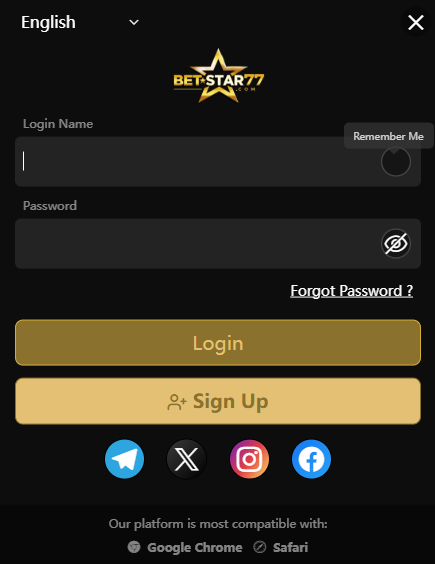
Step 1: Click "Forgot Password"
Select “Forgot Password?” when given the chance to choose it while signing into your account. The action will land you on the password reset page. It is crucial that you confirm the URL of the webpage.
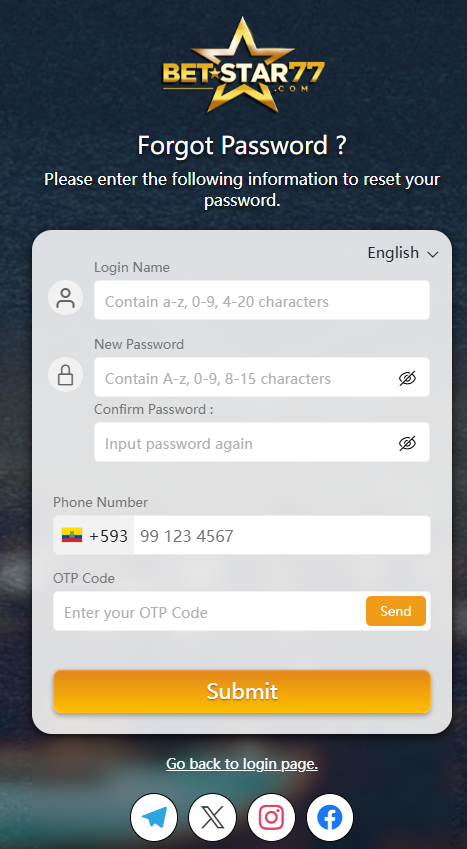
Step 2 : Enter your Login ID
Input your login ID accurately, as any errors will lead you nowhere. You won’t be able to proceed in the procedure.
Step 3 : Create a new Strong Password
Choose a unique and secure password that you haven’t used for your accounts before. It will protect your account for many years to come.
Step 4 : Re-Enter the Password to Confirm
Input the chosen password again in the field “Confirm”. The computer cannot accept two different passwords at once.
Step 5 : Enter your registered phone number
Next up enter your registered phone number. Just make sure it’s the current one linked to your account, If it’s outdated, that text with your reset code might not show up which can definitely slow things down.
Step 6 : Input the 6-digit verification code
You’ll get a 6 digit verification code sent to your phone in just a second. Once it hits your inbox, just type it in exactly as it looks. This is just a quick way to confirm it’s really you so we can finish up the reset securely If it doesn’t show up right away no big deal just gives it a moment and double check that your number was typed in right before you try again.
Common Password Reset Problems
Most issues happen because of:
- A mistyped Login ID
- An incorrect password
- Delays in receiving the verification code
Double-check your details first as that will usually solve your problem instantly.
Tips for Creating a Strong Password
- Mix up the use of letters, numbers, and symbols in your passwords.
- Don’t recycle passwords that have been previously used by you.
- Do not reuse your passwords for different purposes/accounts.
- Choose strong passwords which can easily be remembered yet difficult to decipher.
When to Contact Customer Support
In case you’re unable to change your password, call 24/7 customer support when:
- Your phone number is outdated
- Your verification code is delayed
- The page seems stuck
A quick conversation with support usually resolves the issue fast.
Final Thoughts!
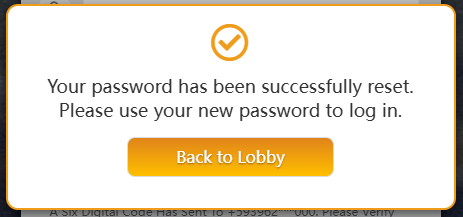
However, the quickest method of regaining access to your account would be through the “Forgot Password?” button. You just need to input your login ID, set a new password, and confirm your mobile number by entering the One Time Password (OTP).
FAQ
What should I do if I forget my password?
Go to the login page, click Forgot Password, and follow the reset procedures displayed on the screen.
Why is my Login ID important during password reset?
The Login ID enables the system to locate the relevant account. If the information is input improperly the reset procedure may fail.
Why do I need my registered phone number?
The registered phone number is used to transmit the verification code needed to authenticate account ownership.
What should I do if I do not receive the 6-digit verification code?
Check that your phone number was entered correctly wait a short moment and contact support if the code still does not arrive.
Why do I need to confirm my new password?
The confirm password field is just a quick double-check to ensure your new password is typed exactly right. It only takes a second but it saves you a lot of frustration by catching typos before they lock you out later.
When should I contact customer support?
Having trouble with the reset? Whether the text is lagging or your details aren’t being accepted just reach out to us, We’ll help you get it sorted out quickly.
Discuss This Guide...
Got questions or insights? Join the conversation and explore more tips from the community.