
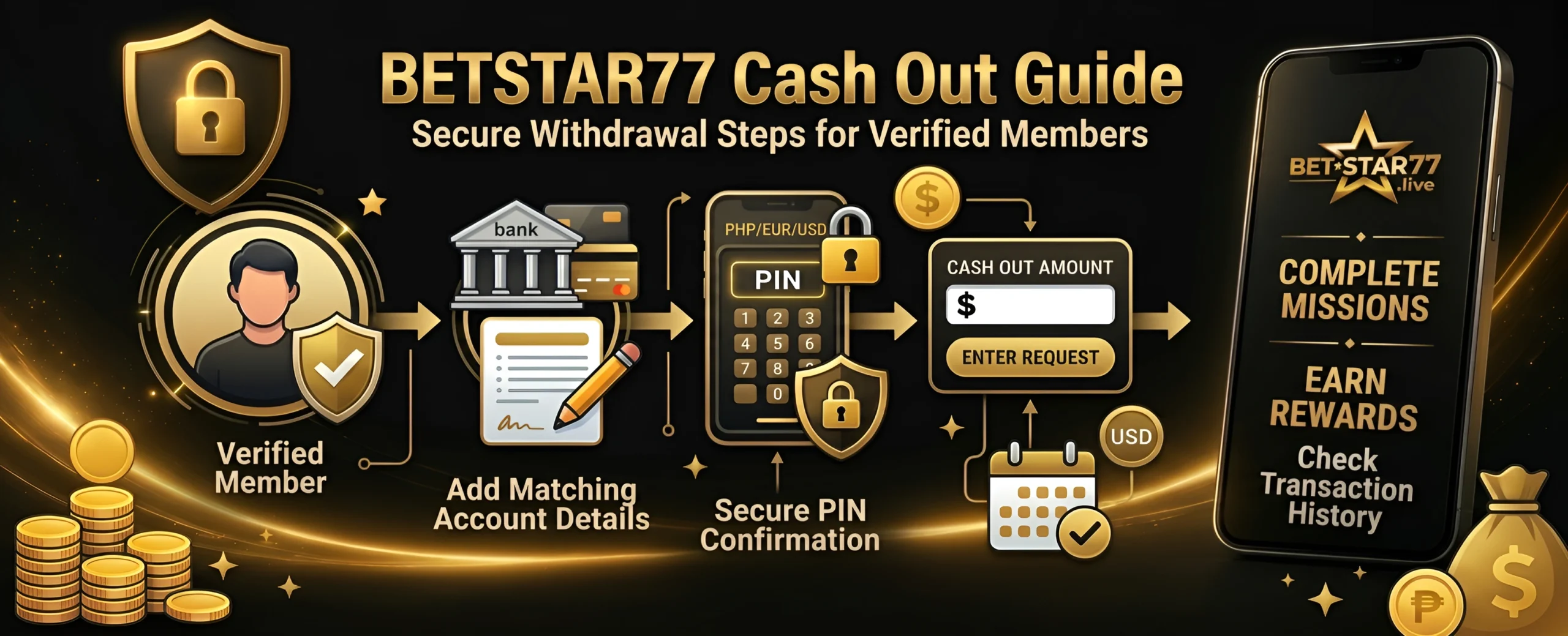
Cash out should feel simple, clear and secure. This BETSTAR77 cash out guide is here to help you understand the steps and what you need to check. You can use it when you want to know about banking details PIN confirmation and transaction history all in one place.
How Does BETSTAR77 Cash Out Work?
BETSTAR77 cash out works through the Banking area. verified member selects Cash Out adds or chooses a payment account enters the request amount confirms the request with a PIN and checks the History tab for the transaction record.
Cash-out tools should support account control and safe money management. Set limits, keep records, and contact support whenever a request looks unclear.
Before You Request a BETSTAR77 Cash Out
A smooth request starts Before you request a cash out make sure to check your account details first. Small errors can slow down verification.
- Use the same name and details linked to your verified account.
- Make sure the bank or payment account is active.
- Check that your PIN is correct before you submit.
- Review the available cash-out methods in your region.
- Keep your transaction reference or history record for support.
BETSTAR77 Cash Out Steps with Image Guide
Step 1: Open the Cash In / Cash Out Area
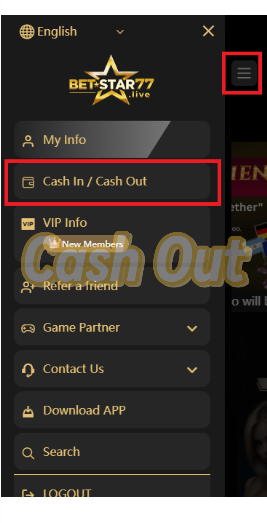
Open the side menu and choose the Cash In / Cash Out option. This takes you to the Banking page where cash-in, cash-out and history tools sit in one place.
Step 2: Choose the Cash Out Tab
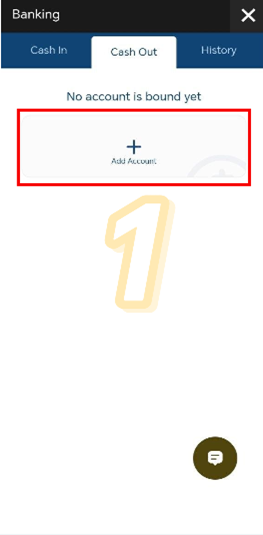
Select the Cash Out tab. If no account has been added yet, the page will show an Add Account option.
Step 3: Select an Account Type
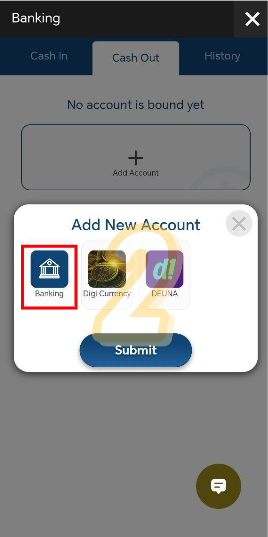
Choose the account type you want to add. The attached guide shows Banking, Digi Currency and DEUNA as available options.
Step 4: Enter Matching Account Details
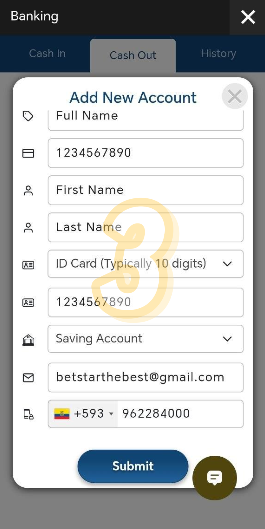
Fill in the new account form carefully. Your full name, account number, identity type, email and mobile number should match your verified records.
Security tip: Mistyped names, account numbers or contact details can cause verification delays.
Step 5: Confirm the Account with Your PIN
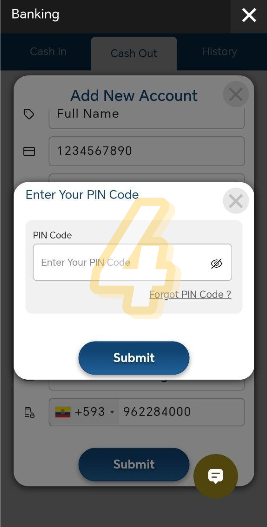
Fill in the new account form carefully. Your full name, account number, identity type, email and mobile number should match your verified records.
Security tip: Mistyped names, account numbers or contact details can cause verification delays.
Step 6: Check That the Account Was Added
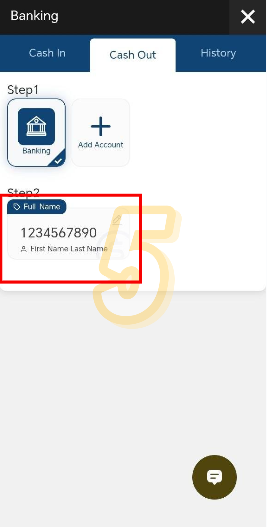
Once the system confirms the account, the new banking account appears under the Cash Out tab. Review the details before moving forward.
Step 7: Enter the Cash-Out Amount
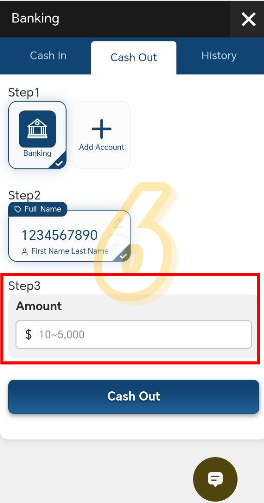
Enter the amount you want to request. Then review the selected account and amount before you continue.
Step 8: Confirm the Cash-Out Request
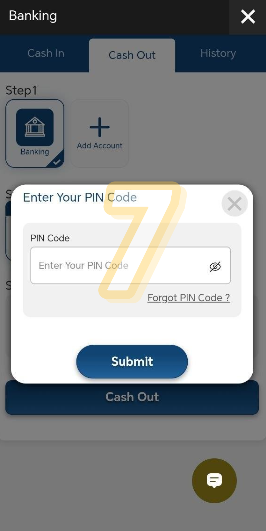
The system asks for PIN confirmation again. This extra check helps protect the account before the request is submitted.
Security tip: Double-check the amount before you confirm the request.
Step 9: Look for the Success Message
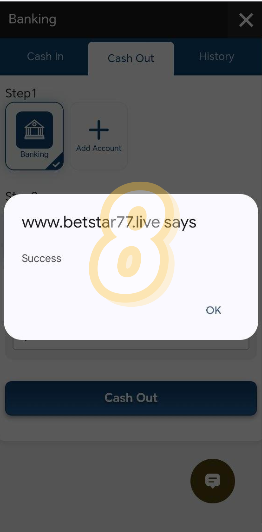
After confirmation, the page may show a success message. This means the request has been submitted for review or processing.
Step 10: Review the Transaction in History
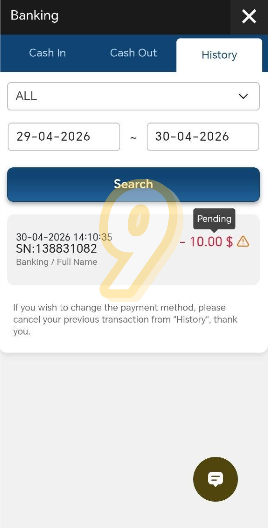
Open the History tab to check the transaction record. You can use filters and dates to find the latest request and view its status.
If anything feels unclear while checking status, the BETSTAR77 TodayPay guide is a helpful reference to understand how payment tracking works.
Why Matching Bank Details Matter?
Banking details should match the account records. This helps the review team confirm that the request belongs to the same verified member.
If the name, mobile number, identity details or account number look different, the request may need extra checks. In some cases, the transaction can fail.
For that reason, review the form before you press submit. A short check can save more time than fixing a failed transaction later.
How to Check Your BETSTAR77 Cash Out Status?
The History tab gives you the clearest record of your request. You can use it to review the date, amount, account type, transaction number and status.
If the status shows pending wait for the review process to continue. If the status does not change after the expected processing window, contact customer support with the transaction reference.
Common Reasons a Cash Out May Need Extra Review
Most delays happen because the system or support team needs to confirm account information. These checks protect both the member and the platform.
Issue | What to check |
Bank name or account name does not match | Use the same details linked to your verified profile. |
Incorrect account number | Review every digit before submitting the request. |
Wrong or forgotten PIN | Use the official PIN recovery option or contact support. |
Pending verification | Check the History tab and keep the transaction reference ready. |
Unavailable payment method | Choose a supported method shown inside the Banking area. |
BETSTAR77 Cash-Out Safety Tips
- Use the official BETSTAR77 site or app links.
- Never share your PIN, password or one-time code.
- Keep your number and email updated.
- Save. Transaction IDs when support asks for details.
- Set limits and take breaks when gaming stops feeling fun.
When Should You Contact Support?
Contact the 24/7 support team if you cannot add an account cannot confirm your PIN see a transaction record or need help with a pending request.
To speed things up share the transaction number, request date, cash-out amount and payment method. Do not share your password or PIN.
If you are a frequent user, you might also notice extra features and benefits over time through the BETSTAR77 VIP program, which is designed for active members.
FAQ
How do I start a BETSTAR77 cash out?
Open the Banking area and choose the Cash Out section. From there, use a verified payment account, enter the amount and confirm the request securely.
Why do I need to add a bank account before cashing out?
The platform needs a valid account destination before it can process a withdrawal request. Matching details help reduce failed transactions.
What should I do if my bank details are wrong?
Do not submit the request. Update the information first or contact support if the system does not let you edit it.
Where can I check my cash-out transaction?
Use the History tab in the Banking area. It shows records such as the date, amount, account type, transaction number and status.
Why is my BETSTAR77 cash out pending?
A pending status usually means the request is still under verification or processing. Keep the transaction number ready if you contact support.
Can support ask for my PIN?
No. Keep your PIN private. Support can help with account issues, but you should not share your PIN, password or one-time codes.
Discuss This Guide...
Got questions or insights? Join the conversation and explore more tips from the community.