

What You Need Before You Start.
Creating an account on BetStar77 is straightforward if you you enter your information accurately from the start. Accuracy matters most during registration. A little error in your phone number, password, or email address might cause delays in verification and future issues with account access or assistance. This guide explains how to register a BetStar77 account, which details you need, and how to avoid common sign-up mistakes. We wrote this guide in a straightforward support format for certified users.
To make the signup a breeze have your details handy pick out a username, a nickname, and a strong password. You’ll also just need a valid email and phone number to wrap things up. Enter your phone number carefully because BetStar77 uses it for verification and account security. Make sure you enter a valid and active phone number correctly, as BetStar77 will send the OTP code to that number after registration. Use the same phone number throughout your profile whenever you need account verification.
If you prepare everything before hitting Sign Up, the entire registration procedure will go lot faster and easier.
How to Register an Account on BetStar77.
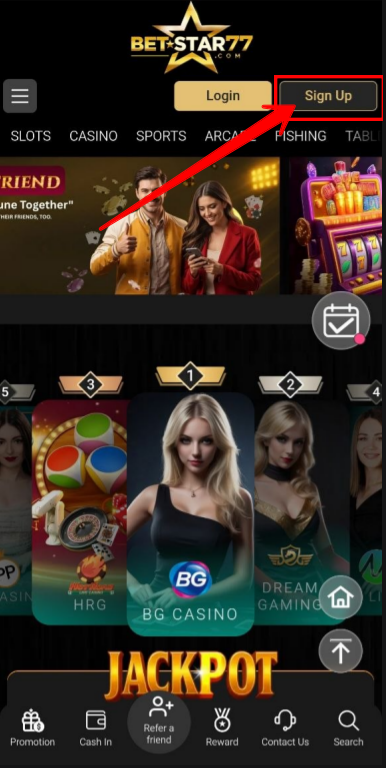
Step 1: Click the Sign-Up button
Head over to the BetStar77 site and hit that “Sign Up” button to get your account started. Just a quick heads-up make sure your Wi-Fi is solid and you’re on the official page before you start plugging in your details.
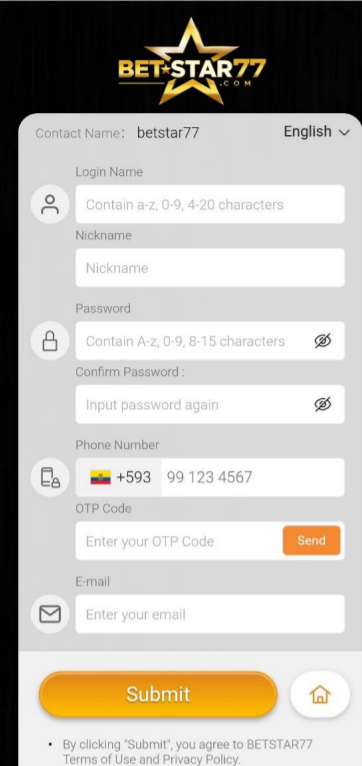
Step 2: Enter your username and nickname
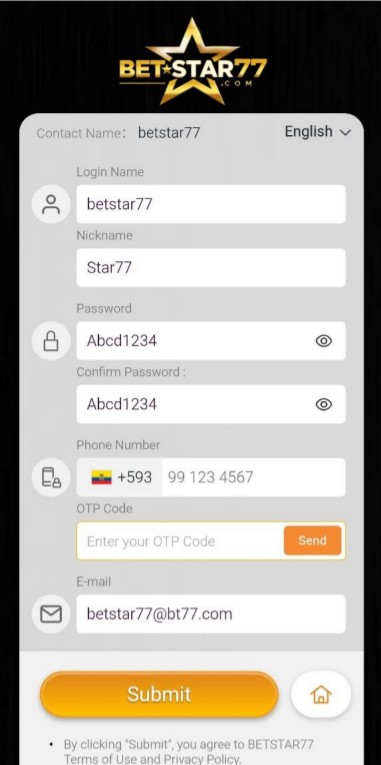
The first portion of the form normally requests your login and nickname. Your username serves as your main login ID, while your nickname appears on your profile. Before continue, choose simple to recall details and double check spelling.
Step 3: Create and confirm your password
Time for a password! Just enter it twice to make sure they match up perfectly Try to go with something strong and original definitely avoid reusing the same ones you have on other sites to keep things secure.
Step 4: Add your phone number
Enter your mobile number carefully into the phone number area. BetStar77 sends your OTP code to this number by SMS, so enter it carefully. If you enter the number wrong, you may not receive the code, and the registration process may end there. Always double-check the total number before continuing.
Step 5: Enter the OTP code
Keep a look out for an SMS containing your OTP code it generally appears within a second. Simply copy it over to validate your number. This step connects your account to your phone and helps protect it from unauthorized access.
Step 6: Add your email address
Next just pop your email into the form It’s definitely best to use your main one so you don’t miss any important updates or run into a headache if you ever need to reset your password down the road.
Step 7: Submit your registration
All done? Just click submit to wrap it up. Once you’re through go ahead and double check your profile settings one last time it’s much easier to fix a small mistake now than it is later on.
Common Registration Mistakes to Avoid.
Most registration issues come from small mistakes. Most users enter the wrong phone number, create mismatched passwords, or make small OTP code errors. You can complete registration in just a few minutes., so it’s absolutely worth sitting down for a moment to double check your information before pressing submit.
Important Tips: BetStar77 Registration.
✅ Double-check that your phone number is correct before submitting.
✅ Use a strong password to keep your account secure.
✅ Match all account details with your official banking information to avoid future issues.
✅ Ensure Active Phone Number typed in the proper format.
- ✅Use a valid email address for account recovery and important notifications.
Why Your Phone Number Must Be Correct
Your phone number plays a key role in the registration process. BetStar77 uses it for OTP verification and may require it if you need to recover or confirm your account.
If you enter the wrong number, you may not receive the code. That can stop registration immediately. For that reason, always check your phone number before you submit the form.
When to Contact BetStar77 Support?
If you cannot complete registration, stop and identify the issue before trying the same step again. Contact customer service directly if you do not receive the OTP, the form fails to submit, or you enter incorrect information.
The support team works 24/7 to resolve registration issues and help users avoid unnecessary delays.
- the OTP SMS does not arrive
- the page does not submit properly
- You entered the phone number incorrectly.
- you need to correct your email address
- you cannot access your account after registration
Final Thoughts!
If you’re looking to get set up on BetStar77 it’s actually pretty simple as long as you take it step by step. Just head to the official site and fill in the basics your username, a nickname, a solid password, and your contact info. Once you verify your phone with the OTP and confirm your email address, you can start using your account immediately. Honestly the best way to avoid any hang ups is just to make sure everything is spelled right before you hit submit.
FAQ
How do I register a BetStar77 account?
Head over to BetStar77 and click “Sign Up” to get started. Walk through the form, verify your number with the text code they send, and add your email address. Just give everything a quick once over before you hit submit to wrap it up.
Why is the phone number important during registration?
The phone number is used for OTP verification, which confirms that the account belongs to the proper user.
What happens if I enter the wrong phone number?
Sometimes that OTP text can take a minute to show up, which can definitely be a bit of a drag when you’re trying to get signed up. If it doesn’t land in your inbox right away, just hang tight for a second so the whole process doesn’t get backed up.
What should I do if I do not receive the OTP code?
First, make sure your phone number was input correctly. If the problem persists, contact BetStar77 customer care for assistance.
Do I need to confirm my password?
Yes. The confirm password area confirms that your password was accurately typed and prevents further login troubles.
When should I contact customer support?
If your registration fails, the OTP does not arrive, or any of your information changes after submission, please contact us.
Discuss This Guide...
Got questions or insights? Join the conversation and explore more tips from the community.